Organizations, workspaces and properties
A Numbat account has three levels.
- The organization holds the plan and the bill.
- A workspace holds the people and the sites. Every plan includes one.
- A property is one site. It can have several approved domains.
Each person belongs to one organization.
Roles
Each person has one role, Owner, Admin or Member, for the whole organization or for one workspace.
| Role and scope | Can |
|---|---|
| Owner, organization | Everything, including plan and billing, closing the account, and making another person an Owner |
| Admin, organization | Plan and billing, every site’s settings, and who has access |
| Member, organization | Read every workspace and edit site settings. Not who has access |
| Admin, workspace | Site settings in that workspace, add sites, and who has access to it |
| Member, workspace | Read that workspace |
An organization-level Admin can do everything an Owner can, except grant the Owner role.
Managing people
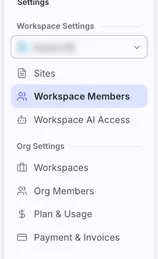
Open Account settings from the menu under your name.
- Org Members, under Org Settings, lists everyone in the organization.
- Workspace Members, under Workspace Settings, lists everyone who can reach that workspace, including people with access from above. Invite people here. They get an email and set their own password.
Billing
Plan & Usage and Payment & Invoices, under Org Settings, are open to the Owner and organization-level Admins.