Tag your ads
Numbat ties each paid visit to a platform, a campaign and an ad, using the parameters on the landing URL. Each platform has a page with a ready template to paste once, so every ad carries it.
Before you begin
- Access to the tracking settings in each ad platform you run.
Required parameters
| Parameter | What to put in it | Example |
|---|---|---|
utm_source |
The platform, in lower case | meta |
utm_medium |
The paid medium for that platform | paid_social, cpc |
utm_campaign |
The campaign name | spring-launch |
utm_id |
The platform’s campaign id | 120210000000000 |
A click without utm_campaign counts as untagged.
A click counts as paid when it has a click id that only ads carry, such
as Google’s gclid, or a paid utm_medium. Meta’s click id alone does
not prove a paid click, so Meta traffic is largely invisible until you tag
it.
Recommended parameters
| Parameter | What to put in it |
|---|---|
numbat_group |
The ad group or ad set name |
numbat_group_id |
Its id |
numbat_ad_id |
The ad id |
These tie a visit to the exact ad, and the IDs stay right when you rename
a campaign or ad group. Numbat also reads numbat_placement,
numbat_network, numbat_creative and numbat_creative_id where a
platform can fill them. No ad platform reads numbat_ parameters, so they
do not change how your ads run.
Templates for each platform
Each page has the string to paste and where it goes. The platform fills in the values on every click.
- ChatGPT Ads
- Google Ads, for Search, Performance Max and Demand Gen
- LinkedIn Ads
- Meta Ads
- Microsoft Ads
- Reddit Ads
- TikTok Ads, for standard and Smart+ campaigns
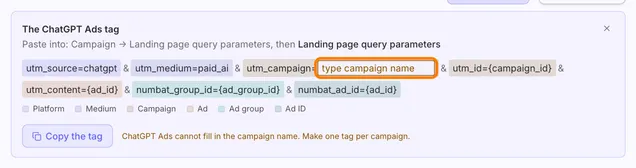
The same strings are in the app. Open Advertise > UTM Tagging and choose Get the tag for a platform. Where the platform cannot fill in the campaign name, type it into the tag box.
Check that it works
Open Advertise > UTM Tagging. The headline shows the share of paid clicks with a correct tag, and the bar shows how many need a fix.

Troubleshooting
A campaign name shows as a placeholder like {campaignid}
The platform did not fill in the macro, because the template is in the wrong field or at the wrong level. Use the field and level on the platform’s page. The UTM Tagging page lists each affected link pattern.
A parameter arrives empty
The template is usually at a level the platform does not fill. Move it to the level on the platform’s page.