AI assistants
Connect an AI assistant and ask it about your traffic, findings, visitors, ad signals, CRM and install status. Access is read-only. The assistant never sees a name, an email address or an IP address, and bots are already removed from its figures.
Before you begin
- Any Numbat plan.
- A membership in the workspace. The assistant sees only what your membership allows. A connection or key can narrow that, never widen it.
The server address:
https://mcp.numbat.io/mcpClaude, ChatGPT, Claude Code and Codex sign in to Numbat, so there is nothing to copy. Other tools use an MCP API key. The same steps are in Numbat, on the Connect an AI assistant card under You > My AI Connections.
Connect Claude
-
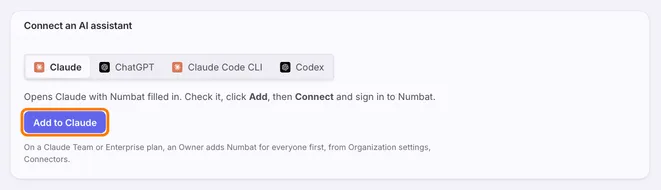
In Numbat, open You > My AI Connections and choose Add to Claude on the Claude tab. Claude opens with Numbat filled in.
-
Choose Add.
-
Choose Connect and sign in to Numbat. Pick the workspace, and all sites or only some.
On a Claude Team or Enterprise plan, an Owner adds Numbat first, under Organization settings > Connectors.
Connect ChatGPT
ChatGPT needs a paid plan. On Business or Enterprise, an admin may need to add Numbat first.
- Open ChatGPT plugins. Choose Add, then Add custom MCP server.
- For Name, type Numbat. Under Server URL, paste the server address. For the logo, download the icon from the ChatGPT tab in Numbat and add it under Icon.
- Leave Authentication on OAuth. Tick I understand and want to continue, then click Create as a plugin.
- Choose Connect and sign in to Numbat.
- In a chat, type @Numbat before your question.
Connect Claude Code
Run this in a terminal, then type /mcp in Claude Code and sign in.
claude mcp add --transport http numbat https://mcp.numbat.io/mcpConnect Codex
Run these in a terminal. The second opens your browser to sign in.
codex mcp add numbat --url https://mcp.numbat.io/mcp
codex mcp login numbat
The Codex app and IDE extension share this setup. On a machine with no browser, use an MCP API key.
Connect with an MCP API key
For tools that cannot sign in, such as the Claude, OpenAI and xAI APIs, JetBrains IDEs, scripts and your own agents.
-
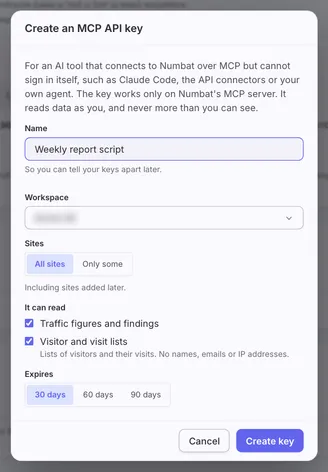
In Numbat, open You > My AI Connections and choose Create key on the MCP API keys card.
-
Name the key.
-
Pick the workspace, then all sites or only some. All sites includes sites added later.
-
Choose what it can read. At least one is required.
-
Choose when it expires: 30, 60 or 90 days.
-
Copy the key. Numbat shows it only once.
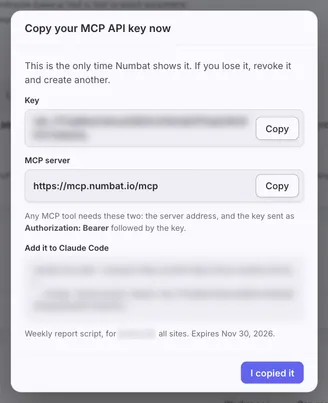
Give your tool the server address and send the key in this header. For Claude Code, the key screen shows the full command.
Authorization: Bearer nbt_...See and remove connections
You > My AI Connections lists your apps and keys in every workspace. Choose Disconnect or Revoke to end one. It stops on the next call.
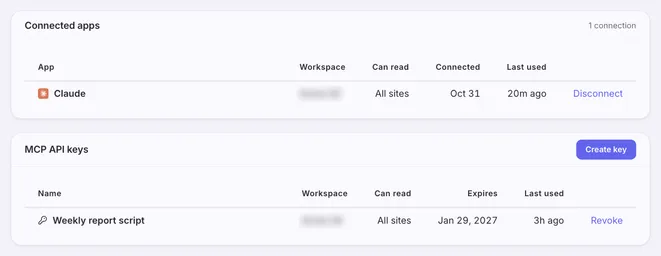
Workspace admins can also end any member’s connection or key, under Workspace Settings > Workspace AI Access.
What a connection can read
| Scope | Shown in Numbat as | Tools |
|---|---|---|
analytics:read |
Traffic figures and findings | list_properties, describe_schema, query, get_findings, what_changed, get_paths_to_goal, get_ad_signals, get_crm_status, get_install_status, get_install_instructions, get_setup_checklist, get_help |
visitors:read |
Visitor and visit lists | list_visitors, get_visitor_sessions, list_promising_visitors |
The assistant picks the tools itself. Dates are inclusive and in the site’s timezone. The assistant does not read ad spend from Numbat, so for cost per result, also connect the ad platform’s own connector. The assistant joins them on the campaign name.
Limits
- Each account has 120 units an hour and 600 a day. A schema call is free, a plain query costs 1, and bigger calls cost more. Contact us for more.
- Each call has a 3 second database time limit.
What to know
- A key reads data as you and works only on the MCP server. You can’t create one while Numbat support is signed in to your account.
- An expired key stays on the list, grayed out.
- The raw session count and the invalid share are the only figures that include bots.
- The server uses the Streamable HTTP transport.
- Cursor, Gemini CLI, Copilot Studio, Perplexity and Mistral can’t sign in yet. Any that accepts a custom header can use an MCP API key.
- Numbat is not in the Claude or ChatGPT connector directories yet. Use the steps above.
Security
- Sign-in uses OAuth 2.1 with PKCE, open only to Claude, Claude Code, ChatGPT and Codex, pinned by client ID.
- Tokens are stored hashed. An access token lasts 1 hour. Refresh tokens rotate on each use and expire after 90 days unused.
- Every call is checked against your membership. Remove a person and their next call is refused.
- Every call is logged with the tool, time, person and connection or key.
Troubleshooting
The assistant says it is rate limited
The account used its units for the hour or the day. The message says how
long to wait. Ask the assistant for get_help to see what is left.
A key stopped working
It may have expired or been revoked. Check You > My AI Connections and create a new one.
The assistant cannot see a site
The connection, the key or your membership may be limited to some sites. Connect again and pick all sites, or create a new key.
Next steps
- HubSpot, so the assistant can answer CRM questions.
- Tag your ads, so campaign names match the ad platform’s connector.
Checked against Claude and ChatGPT connector screens, October 2026.