Install the script
Numbat is one script tag in your page template. Serve it from a subdomain
you own, such as data.example.com. It takes one DNS record and is
included in every plan.
Can’t change DNS today? Use the standard tag now and switch later.
Why your own subdomain
The standard tag loads from Numbat’s shared domain. From your own subdomain:
- Ad blockers don’t drop your visitors.
- Safari recognizes visitors when they come back.
Numbat runs the certificate and the server. There is nothing to host.
Before you begin
- Access to your domain’s DNS settings.
- Access to your site’s
<head>or page template.
1. Add your subdomain
-
In Numbat, open Property > Script.
-
In the Your own domain card, type a subdomain such as
data.example.comand choose Add domain.Pick a neutral name, not one that says Numbat. A bare domain such as
example.comwon’t work.
The card now shows the DNS record to add.
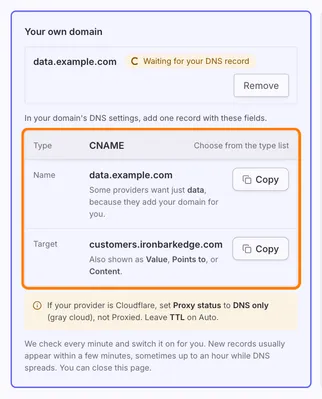
2. Add the DNS record
-
Open the DNS settings where your domain is managed. That is usually where you bought it, or Cloudflare if you use it.
-
Delete any other record on the same name, such as an A record.
-
Add a CNAME record.
Type    CNAME
Name    data
Target  customers.ironbarkedge.com
Type only
datain the name field. Most providers add your domain for you. -
On Cloudflare, set Proxy status to DNS only (gray cloud).
Numbat checks every minute. The card usually switches to Serving your code within a few minutes, sometimes up to an hour. You can close the page.
| Provider | Name field | Target field |
|---|---|---|
| Cloudflare | Name | Target |
| GoDaddy | Name | Value |
| Namecheap | Host | Value |
| Squarespace Domains | Name | Data |
| Wix | Host Name | Value |
| Hostinger | Name | Target |
| IONOS | Hostname | Points to |
| Porkbun | Host | Answer |
| Amazon Route 53 | Record name | Value |
| Vercel | Name | Value |
On Hostinger, turn off Hostinger CDN for the subdomain.
3. Add the tag
-
When the card shows Serving your code, choose Copy code.
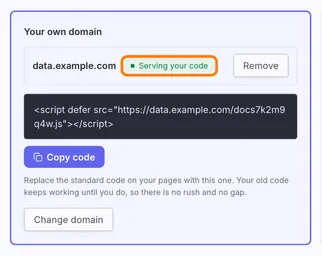
-
Paste the tag into the
<head>of every page. On most sites, that is the shared page template.<script defer src="https://data.example.com/<your-site-id>.js"></script> -
Deploy.
Replacing the standard tag? Swap it for this one. There is no gap in data.
If you cannot change DNS today
-
Open Property > Script. Under Standard, choose Copy code.
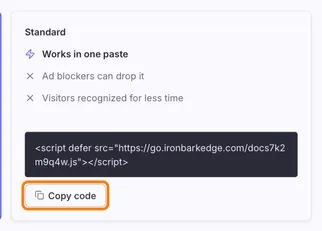
-
Paste it into the
<head>of every page and deploy.<script defer src="https://go.ironbarkedge.com/<your-site-id>.js"></script>
Ad blockers drop some visitors with this tag. Switch to your own subdomain when you can, with steps 1 to 3 above.
Check that it works
On Property > Script, the status reads You’re live within about a minute of your first visit.
In your browser’s developer tools, the script and its /e requests should
load from your subdomain.
What to know
- The same tag works on every domain you approve.
- Single-page apps need nothing extra. A new history entry counts as a page view.
- Pasting the tag twice is harmless.
- Each site can have up to 2 custom domains.
- Safari limits the cookie to 7 days, even on your own subdomain. Numbat bridges the gap with a token in the page’s storage.
Troubleshooting
The card stays on “Waiting for your DNS record”
- Check the record against the one in the card. Look for a doubled name
such as
data.example.com.example.com. - On Cloudflare, set the record to DNS only. A Proxied (orange cloud) record never works.
- Check that the record is at the DNS host your nameservers point to.
That may not be your registrar.
dig NS example.com +shortshows where that is. - Check that no other record uses the same name.
- Wait. Some providers take up to 48 hours.
On Wix and IONOS, the record only works while the domain uses their nameservers.
The record works, but the certificate never arrives
Your domain probably has CAA records. Add ones that allow
letsencrypt.org, pki.goog and ssl.com. A CAA record on a parent
domain counts too.
The card shows “Could not verify”
Numbat stops checking after 7 days. Remove the domain, fix the record and add it again.
Next steps
- Approve your domains
- Tag your ads
- Content Security Policy, if your site sets one.