Quick start
Numbat records its first visit a few minutes after you add one script tag to your site.
Your 30-day trial starts from that first visit, not from signup. It ends no later than 60 days after signup, so install within your first month to get the full 30 days.
Before you begin
- A website you can edit, or someone who can edit its page template.
- A work email address you can open now. The confirmation link expires in 24 hours.
1. Create your account
- Go to app.numbat.io/signup.
- Fill in First name, Last name, Work email, Company name, Company website and Password, then choose Create account.
- Open the confirmation link in the email we send you.
- Wait for approval. Most accounts are reviewed by hand, and you get an email titled “Your Numbat account is ready”. Then sign in. If your account is approved automatically, the confirmation link signs you in.
2. Add your site
-
Sign in. The setup page opens.
-
Under Site address, type your site’s hostname, such as
example.com, and choose Add this site. This also approves that hostname.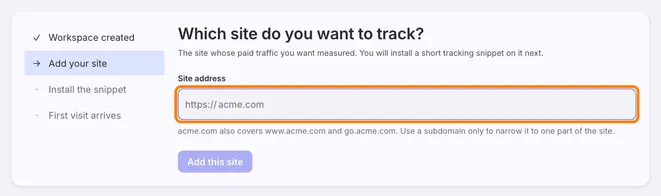
3. Install the snippet
We recommend serving the snippet from a subdomain you own. Ad blockers drop fewer visitors, and Safari recognizes returning ones. It takes one DNS record.
From your own subdomain (recommended)
-
On the setup page, choose the Custom domain tab.
-
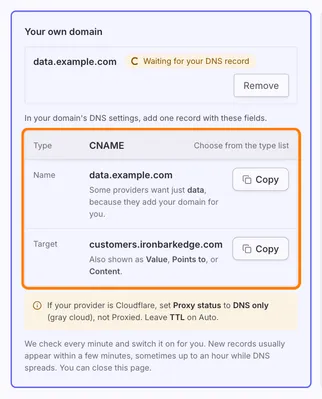
Type a subdomain such as
data.example.comand add it. -
Add the CNAME record the tab shows to your domain’s DNS. The full DNS steps cover each provider.
-
When the tab shows Serving your code, copy the tracking code.
<script defer src="https://data.example.com/<your-site-id>.js"></script> -
Paste it into the
<head>of every page. On most sites, that is the shared page template. -
Deploy.
Standard, if you cannot edit DNS today
-
Copy the code on the Standard tab.
<script defer src="https://go.ironbarkedge.com/<your-site-id>.js"></script> -
Paste it into the
<head>of every page and deploy.
You can switch to your own subdomain later, with no gap in data.
4. Check that it works
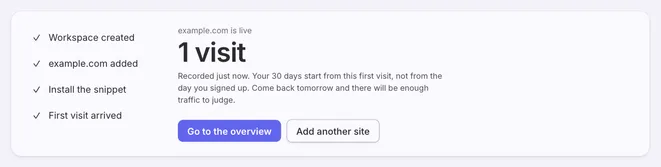
Visit your own site once. The setup page checks every 6 seconds and shows
1 visit when it lands. If you closed the page, you get an email titled
“
Next steps
- Next steps, the setup that pays off after the first visit.
- Approve your domains, if the tag runs on more than one hostname.