Emission status
Each ad platform has a row on Ad Signals, with its state and the share of qualifying visitors sent to it. Choose the row to open the platform’s page.
States
| State | Meaning | What to do |
|---|---|---|
| Included with Optimize and Attribute | Your plan does not include ad platform signals | See Plans and limits |
| Not connected | No details saved yet | Follow Connect Meta or Connect LinkedIn |
| Not sending yet | Setup has started but signals are not on. The open step says what is left, and a note inside it names anything that blocks turning on: details not verified, consent not set, or a LinkedIn rule that was likely deleted | Finish the open step |
| Sending | Signals are on | Nothing |
| Paused | You paused sending. Details and history are kept. Anything queued when you paused is still waiting | Choose Resume sending to send what is waiting, if it is still recent enough for the platform. Visitors who qualify while paused are not sent later |
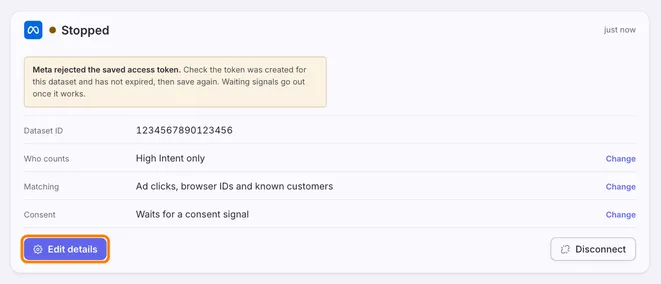
| Stopped | The platform refused the saved token | See below |

Sent and not sent
The row shows the share sent in the last 14 days, and how many. On the platform’s page, Why N visitors were not sent lists the rest by reason, largest first.
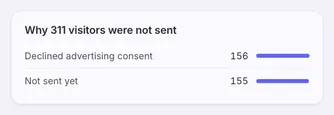
Two reasons need nothing from you.
- Not sent yet. Numbat waits about 35 minutes for a visit to settle before it queues the conversion.
- Sending now. The conversion is queued, or being retried after a temporary error.
The other reasons, and what to do:
| Reason as shown | Meaning | What to do |
|---|---|---|
| No identifier the platform can use | The visitor arrived without a click id, cookie or contact detail the platform accepts | Check Tag your ads, and turn on known customer matching under Consent and matching |
| Declined advertising consent, or No consent signal | The consent check refused the send | See Consent and emission |
| Global Privacy Control on | The browser asked not to share data, and the platform has no way to honor that while counting | Nothing. This is the visitor’s choice |
| The platform refused the access token | The token was revoked or expired | Enter a new token and verify, as below |
| The conversion rule was likely deleted | LinkedIn only | Replace the access token on the LinkedIn page, and Numbat adds a new conversion. See Connect LinkedIn |
| Older than the platform accepts | The visitor qualified too long ago to be sent now, for example while sending was paused | Nothing |
| Retrying after the platform rate limited us | Temporary | Nothing. Numbat retries |
Meta visitors sent under Limited Data Use show as “not used for targeting”. Meta counts them but cannot add them to an audience.
Three states, three screens
Sent, received and matched are different numbers. Numbat shows only the first.
| State | Where to see it |
|---|---|
| Sent by Numbat | Sent, on the platform’s page in Numbat |
| Received by the platform | Meta Events Manager, on the dataset’s Overview. LinkedIn Campaign Manager, on the rule’s conversion tracking page |
| Matched or attributed | Meta’s event match quality and customer information views. LinkedIn’s match rate on the rule |
A received conversion is not yet attributed. The platform must match the visitor to someone it showed an ad to, and only its own screens report that.
Stopped
The platform refused the saved token. Sending pauses and waiting visitors are kept.
On Meta:
- On the Meta page, choose Edit details and enter a new token.
- Choose Save and verify.
On LinkedIn, choose Replace beside Access token, paste a new token and choose Save token. If you set LinkedIn up by hand, choose Edit details, save, then turn signals on again.
Saving alone does not resume sending. The platform must accept the new token first.