Approve your domains
Numbat records events only from hostnames on your approved list.
Warning. Events from a hostname that is not on your approved list are dropped. Nothing is recorded, and no error appears on your site.
Before you begin
- The list of hostnames your tag runs on. Include staging or test hosts only if you want them measured.
Steps
- Open Property > Script.
- Under Approved domains, type a hostname such as
example.comand choose Add domain. - Repeat for every other domain the tag runs on.
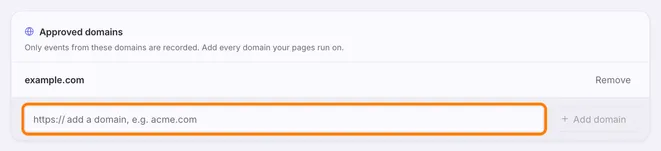
Approval works at once, with no new code. A domain also covers its
subdomains, so example.com covers www.example.com and
go.example.com.
Check that it works
The status line on the page shows one of three states.
- You’re live. Events are arriving.
- Traffic has gone quiet. No events in the last 7 days.
- Check again. No event has arrived yet.

Unapproved domains
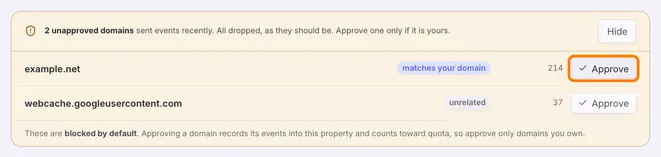
A line such as 2 unapproved domains counts hostnames that sent events in the last 7 days. Choose Review to list them, then Approve to fill the add field with that hostname.
Approve only domains you own. An unknown hostname is usually a scraper or a copy of your page, and its events count against your quota.
Troubleshooting
Status stays waiting
The tag is not running on an approved domain. Look for your hostname in
the unapproved list and approve it. If it is not there, check that the
tag is in the page <head> and the page is deployed.
Status shows quiet
If traffic has not stopped, the tag was removed, most often by a deploy that replaced the page template. Add it back. The status returns to live with the next event.