Troubleshooting
The script never shows an error on your page. Check the app’s status page and your browser’s developer tools instead.
No visits after installing
Open Property > Script. If the status is still waiting, check these in order.
-
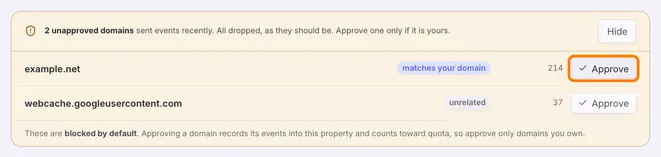
Look for a line such as 2 unapproved domains. Choose Review. If your hostname is listed, its events were dropped. Choose Approve.
-
Open your site with the developer tools’ network panel. The request for
/<your-site-id>.jsshould return 200. If it is missing, the tag is not in the<head>, or the change is not deployed. -
Look for a POST to
/eon the same host. A 204 means the event was recorded. Numbat shows it within about a minute.
Status shows “Traffic has gone quiet”
No events in the last 7 days. If your traffic has not stopped, a deploy probably removed the tag. Add it back, and the status returns to live with the next event.
Requests to /e return 503
An ad or tracker blocker in your browser causes this, not Numbat. The collector never returns 503. It answers 204 or 202 when it accepts an event, and 4xx when it refuses one. Try a browser profile with no blocker.
Blockers drop visitors while the script loads from Numbat’s shared domain. A custom domain fixes that.
Requests to /e are slow
Each /e response has a Server-Timing header that splits the time into
named steps. Read it in the network panel, and include it if you contact
support.
Returning visitors are not recognized
- On the shared domain, Safari visitors are not recognized when they return. A custom domain fixes that.
- On a custom domain, Safari keeps the cookie for 7 days. A token in the page’s storage bridges the gap when that storage survives.
- When
analyticsconsent is denied, Numbat holds no identity. See Consent.
The custom domain never activates
The DNS record does not point to Numbat yet. Check it against the record shown in the app. On Cloudflare, it must be DNS only (gray cloud). After 7 days, the domain shows Could not verify. Remove it and add it again. Install the script has the full checks.
A campaign name is a placeholder like {campaignid}
The ad platform did not fill in the macro. The template is in the wrong field or at the wrong level. Advertise > UTM Tagging lists each affected link pattern, and Tag your ads links to the right field for each platform.